
When the delivery date moves and the shop says nothing, customers do not wait politely. They ask where is my order. Then some ask to cancel. Then some open a dispute. The late parcel is annoying. The silence is what turns a two-day slip into tickets, refunds, and a shopper who does not come back.
Narvar’s 2025 State of Post-Purchase survey (3,461 US online shoppers) puts numbers on that. 74% had a late delivery in the past year. 86% hit at least one delivery issue. After a late delivery, 60% of shoppers aged 18-29 said they would not buy from that retailer again (17% of shoppers 60 and over said the same). Narvar’s CEO names the P&L line in plain words: support costs, cancellations, and lost loyalty. There is no clean public study that says “X% of quiet delays become refunds” – so we do not invent one. The pattern in a real inbox is still visible: no new date, then where is my order, then “cancel it.”
Why customers ask where is my order
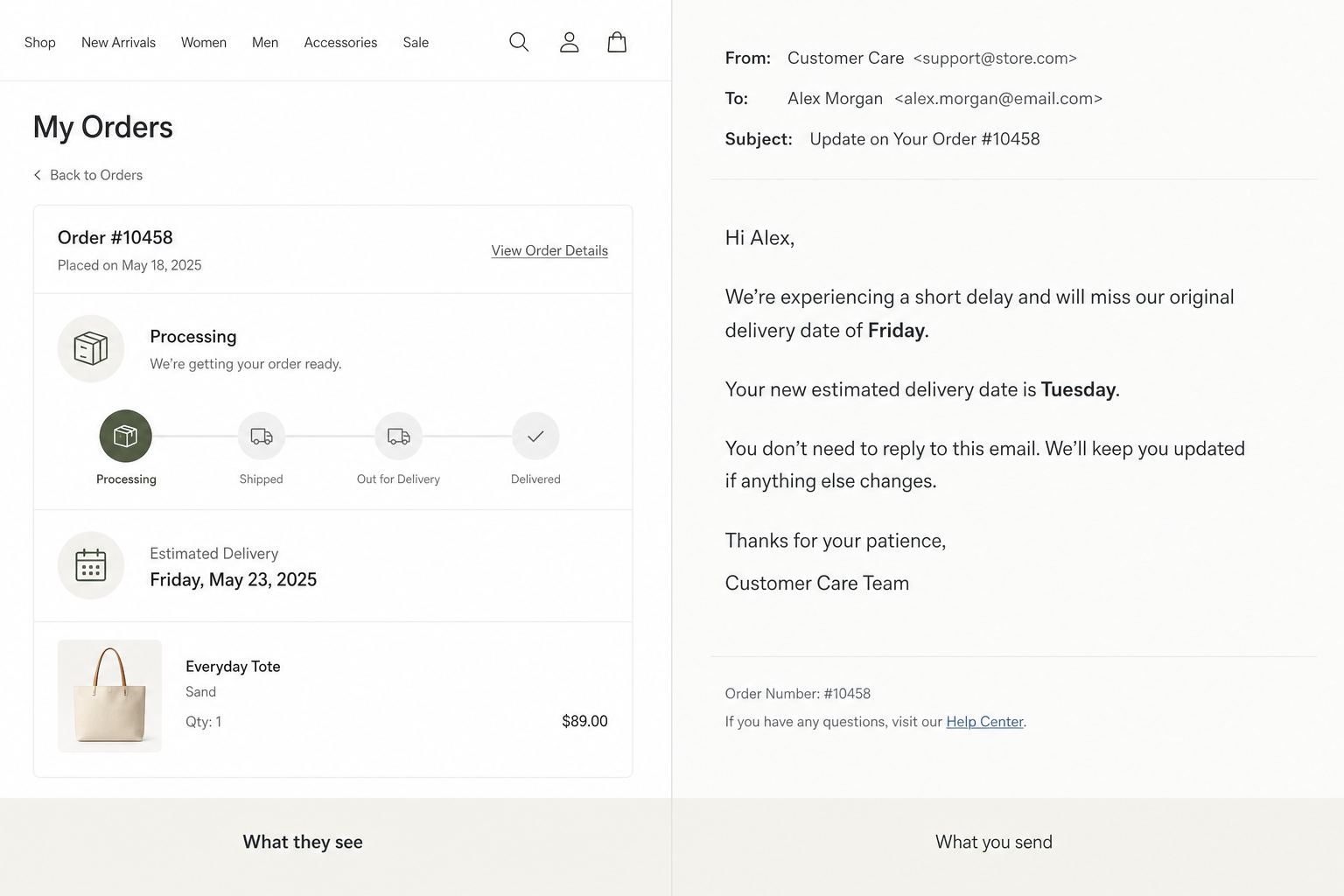
In the back office the row still says Processing. Or it says Shipped, with Friday from checkout still sitting there. The customer does not live in your status list. The last thing they heard was the confirmation: arrives Friday. Every quiet day after that feels like a lost parcel, even when the box is on your shelf for a boring reason.
That Friday was a promise. You already used a delivery line on the product page if you followed what should be on a product page. Narvar found 73% of shoppers say an estimated delivery date affects the buy decision, and 40% will not buy if no date is shown. When that date moves and you stay quiet, the ticket is them writing the update you skipped.
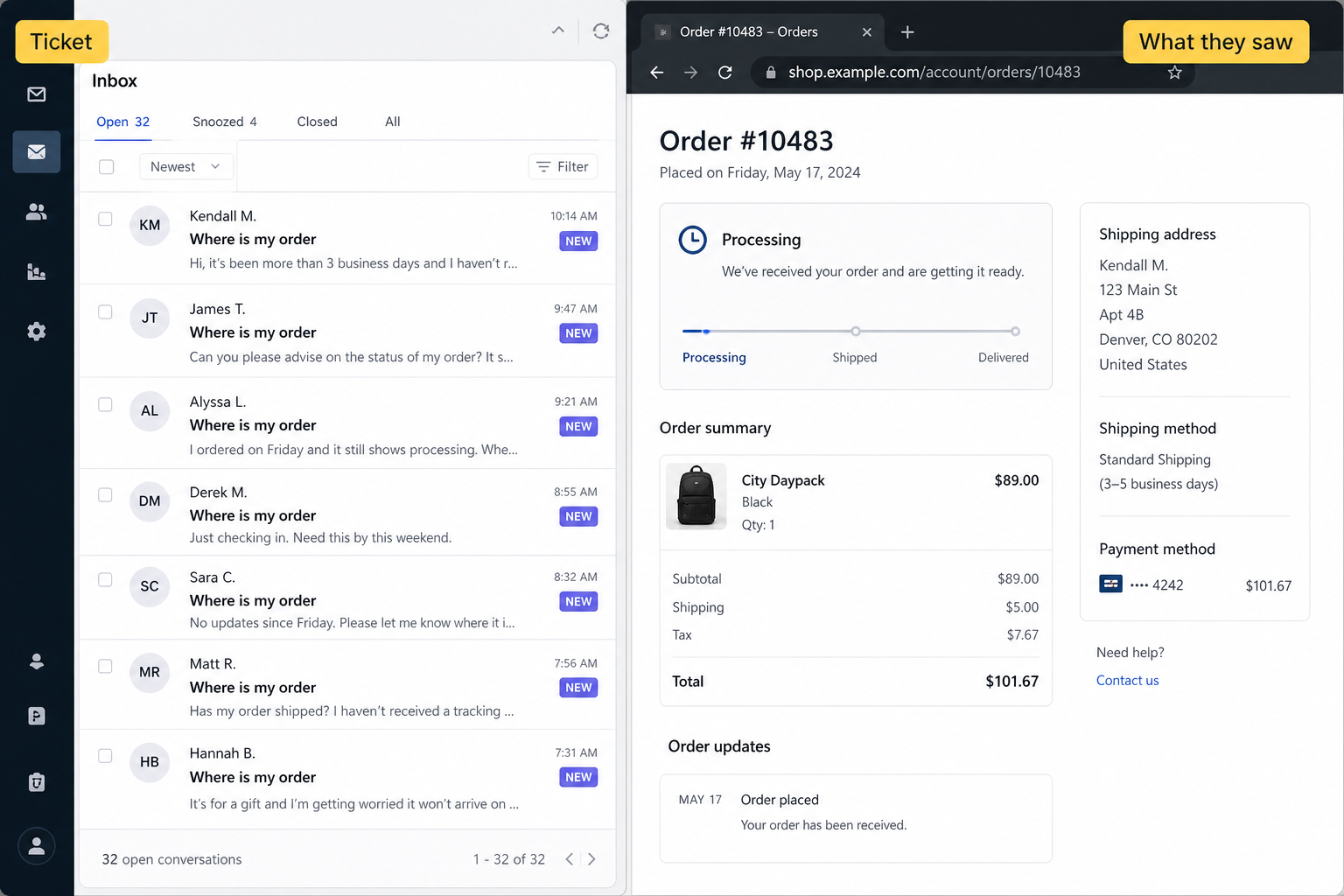
We keep seeing the same loop. Confirmation promised Friday. Friday morning the order history still says Processing. Support pastes “it’s on its way,” or a tracking URL that still says label created. The delay was two days. The thread is twelve emails.
What to put in the delay email
If you are already answering the ticket, you are late. The useful mail lands before they type. Short. Not a brand story. Three facts:
- What slipped. Warehouse backup, carrier miss, a size that had to be swapped – one clause. “Unforeseen circumstances” reads like you are hiding.
- The new date. A day, or a tight range you can hit. “As soon as possible” earns the second ticket.
- What they should do. Usually nothing. Sometimes reply. Sometimes a link to the order, not five status pages.
Sorry is optional. Information is not. A polite void still leaves them refreshing the order page. Narvar’s shoppers, when something goes wrong, want acknowledgement, a clear explanation, and a live update before they have to ask (about 45-46% named each of those).
A tracking link is not enough
Carrier pages lag. They sit on “label created” for a day. They contradict the date you printed at checkout. A tracking URL can ride along. It does not replace the sentence that Friday is now Tuesday.
Finding a missing number in admin is a different job. If the bug is “we never bought a label,” that is a missing tracking queue – filters, a list, someone who ships. This post is the customer-facing line when the promise already moved. Mix the two and you will keep pasting tracking into tickets that were asking for a date.
Send the update before they email you
The cheap mail is the one you send when you already know Friday will miss – warehouse full, carrier scan late, stock you thought you had. Waiting for the fourth ticket is the same paragraph, billed as support time.
Use a trigger you can run without a meeting: the promised date will miss, it already missed, or status has sat on Processing past your own SLA (forty-eight hours is a common shop rule; use yours). Send from the order-status template, not a newsletter with tracking junk in the footer.
Check your last 10 tickets
Open the last ten threads. For each one, write down what the customer could see at that moment: last email, order-history status, date on the page. If the answer is Processing plus the original Friday, the copy is the bug. Hiring another inbox person will not invent a new date.
You will also catch the Shipped version: a shipped mail that never updated the date after the carrier slipped, so the customer is staring at Friday on a Tuesday scan. Same silence, fancier status.
When they already want out: cancel, refund, chargeback
Once the customer has had to chase you, the ticket is no longer only “where is it.” It is “I don’t trust this shop.” That is when they ask to cancel, demand a refund while the box is still moving, or file an “item not received” dispute. You still owe them the new date. You also owe them a way out that is cheaper than a fight.
Minimize the damage in this order:
- Answer with the new date and a choice. Wait until Tuesday, or cancel now. Do not make them repeat the question to earn the cancel.
- If the box has not shipped, cancel and refund without a lecture. A refund you offer is cheaper than a chargeback fee plus the same refund after the bank side. If it has shipped, say so, give the new date, and say what you will do if Tuesday also misses.
- Stop pasting the same tracking URL. They already asked for a date. Tracking that still says label created is how you talk them into the dispute form.
- Put the new date on the order page in the account, not only in email. That page still talks when Gmail is rude.
A small credit on the next order can help after a real miss. It does not replace the sentence with the new date. Information first; goodwill second.
Use the order emails you already have
PrestaShop, Shopify, and Woo all ship order-status and shipping templates. Put the three facts in those mails, and on the order page. You do not need a marketing campaign about delays.
If the mail never arrives, that is a delivery problem – spam folder, broken SMTP, the shop From address. Fix that. It is still not an excuse for the account page to sit on Processing with the old date.
The delay can be real. The ticket, the cancel, and the chargeback are often optional. Processing with no next sentence is how you volunteer for all three.